Docstrings to HTML Reference Guide
When I write Python code, I try to follow the principles of documentation-as-code. I typically write NumPy-style docstrings, like this code from my pitch_detector project:
class Buffer:
    """
    Audio buffer class, which holds and processes audio data.

    NOTE: Only 1-dimensional (single channel) buffer supported
     at this time.

    Attributes
    ----------
    logger : pitch_detector.log.Logger
        Logger for file and terminal.
    sample_rate : int, default=44100
        Audio sample rate.
    data : collections.deque
        Buffer containing audio data.
    ramp_up : int
        Count for initial filling of data (buffer).
         Once ramp_up is large enough, processing begins.
    """
    def __init__(self, logger, sample_rate=44100):
        """
        Parameters
        ----------
        logger : log.Logger
            Logger for file and terminal.
        sample_rate : int, default=44100
            Audio sample rate.
        """
        self.logger = logger
        self.sample_rate = sample_rate
        self.data = deque(maxlen=sample_rate)
        self.ramp_up = 0
Tools that convert this type of docstring to a reference guide (like this) already exist (see Sphinx with the numpydoc extension). But I’d like to develop my own limited version of this tool as an exercise.
Plan
My only assumption is that the provided Python code has no syntax errors.
1. Don’t Reinvent the Wheel: Utilize built-in attributes and helper libraries
My initial idea involved painstakingly parsing .py files as text, checking for keywords like class or def. But Python’s built-in __doc__ attribute and the inspect module make this approach moot.
I’ll also use the markdown library to convert markdown docstrings into HTML.
2. Picturing the Final Product
The final product will be an HTML file with collapsible sections containing docstrings. Because each module has an unknown number of nested members, it’s best to utilize a recursive function.
The Code
Initial Implementation
What we need is a function that takes an object (module, class, function, whatever) and
- Adds the object’s docstring to an HTML doc
- Recursively add the object’s members as collapsible HTML sections. I implemented this function as follows:
def add_docstrings(f, object):
    """
    Recursively find the docstrings of an object and its members,
     adding to an HTML script.

    Parameters
    ----------
    f : [file object](https://docs.python.org/3/glossary.html#term-file-object)
        The HTML file to which docstrings will be written.
    object : any
        An object with a docstring, i.e., __doc__ attribute.

    Returns
    -------
    None
    """
    time_difference = datetime.now() - start_time
    if time_difference.total_seconds() > 60:
        raise RuntimeError(
            "This program is taking too long."
        )
    for name, obj in inspect.getmembers(object):
        if name.startswith("_") or name.startswith("__"):
            continue  # Ignore "private" types and functions
        if not (inspect.isfunction(obj) or inspect.isclass(obj)):
            continue  # We only care about classes and functions
        if obj.__doc__ is None:
            continue  # TODO: note classes and functions without docstrings, too
        try:
            html = markdown.markdown(obj.__doc__)
        except Exception:
            print(f"Couldn't convert docstring for {name}.")
        f.write(f"<details><summary>{name}</summary>")
        f.write(html)  # Add docstring of obj
        add_docstrings(
            f, obj
        )  # Recursively add members of obj before collapsing section
        f.write(("</details>"))
        # Close collapsible section of HTML script
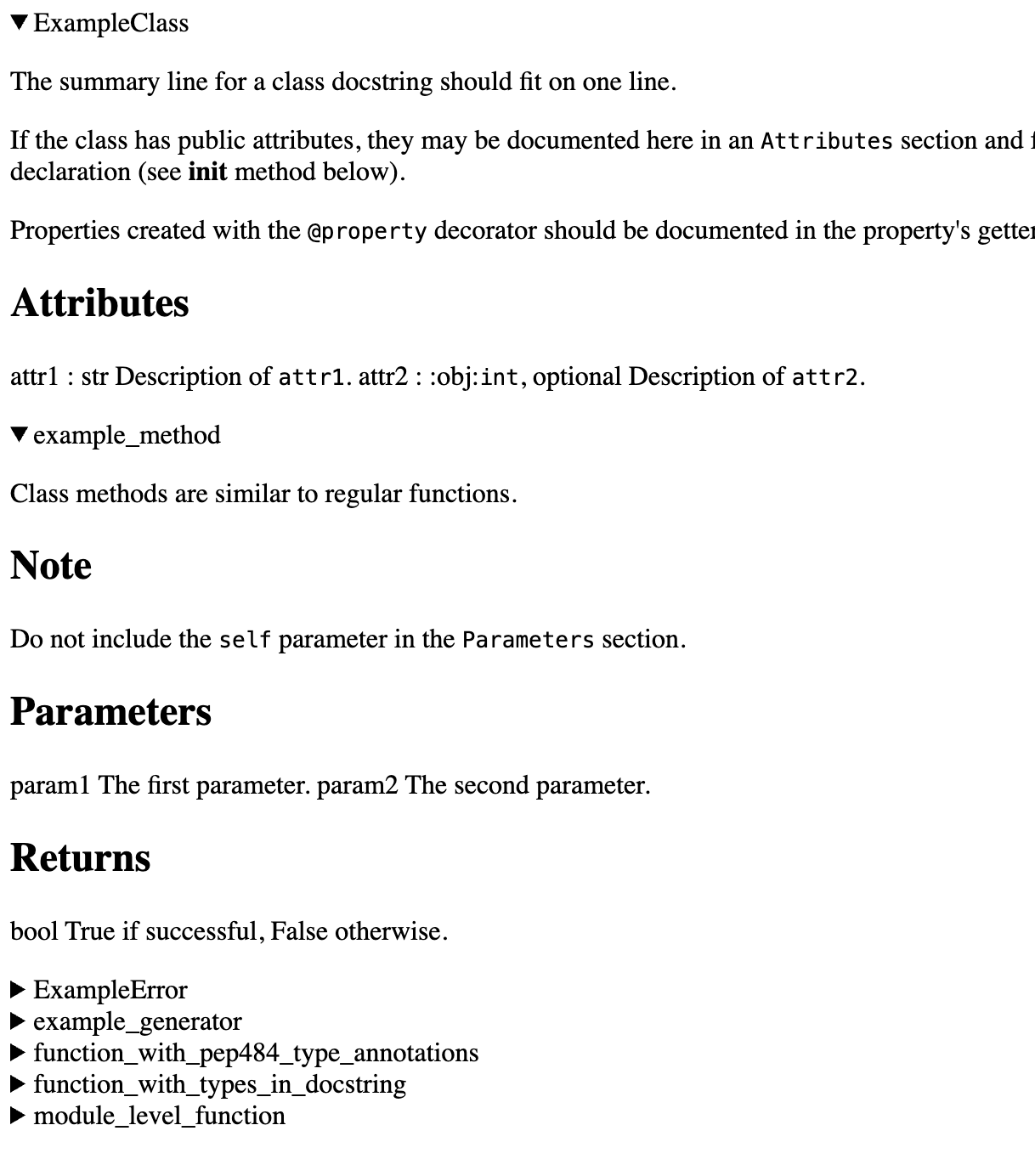
I tested it against the example I provided before and the result generally matched my expectations:
Some Touch-Ups
With that function complete, all that’s left to do is format the text and add a command-line option for selecting the module.
Selective imports
I utilized argparse and importlib to do selective imports upon user request.
Other
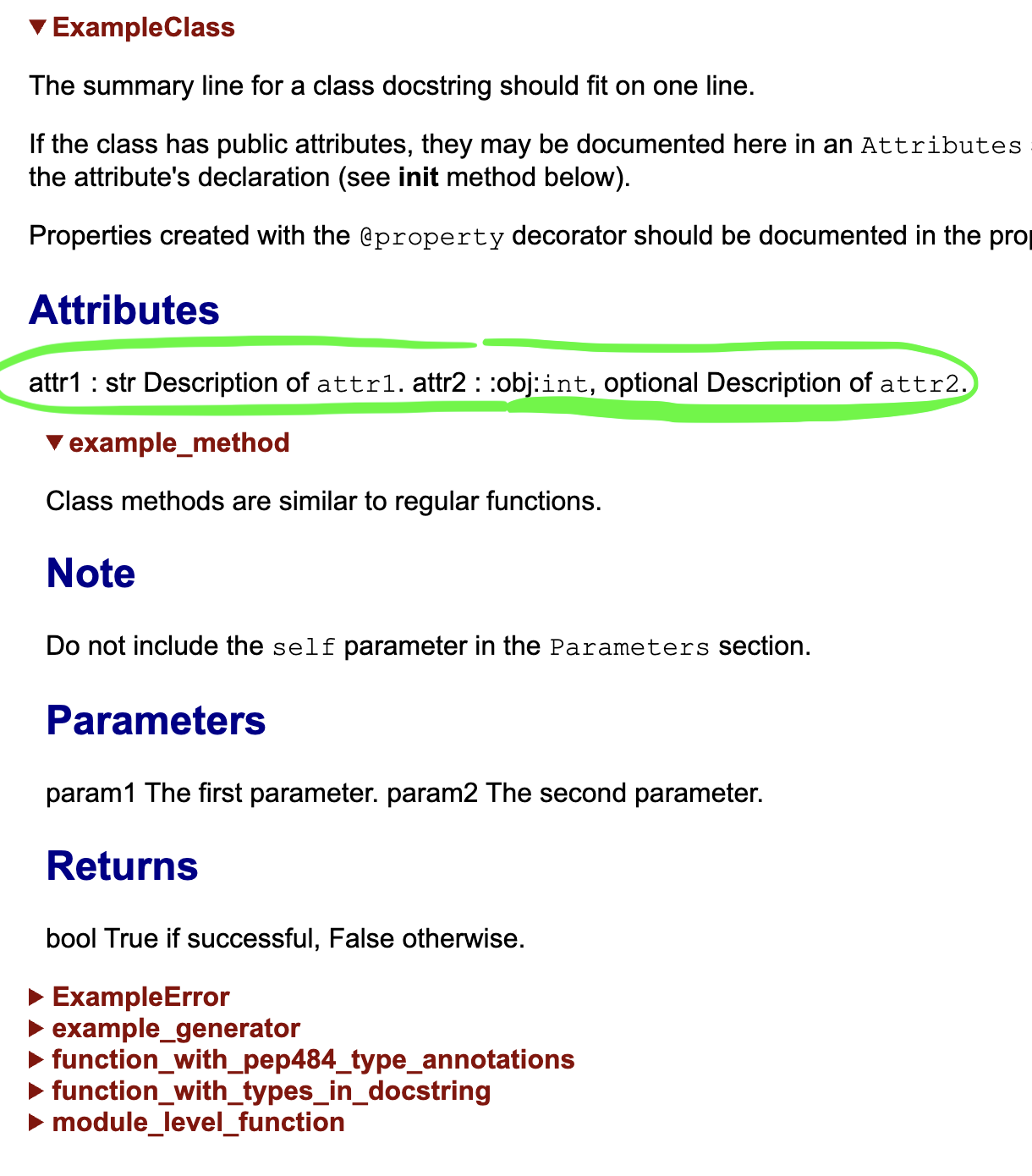
I also added a function that adds indentation for headers and paragraphs based on the depth of the recursion. Though I ironically didn’t have time to implement full parsing of the NumPy-style docstrings, I did improve the font and color scheme with the help of ChatGPT and some CSS.
The semi-final product — what I’d call a pre-alpha version — looks like this:
Conclusion and Improvements
This project is still clearly unfinished, as we can see that the NumPy-style docstrings are still not clearly displayed (see the second screenshot, the section circled in green). However, this project was still a fun exercise!